Home Office Reviews
Samsung LS27D366 27-Inch Curved Monitor Review for Home Office 2026

Introduction
If you’ve been stuck staring at a flat, low-refresh office monitor that makes spreadsheets feel like a chore, the Samsung LS27D366GANXZA is the gentle nudge your desk setup needs. This 27-inch curved display isn’t trying to be a professional-grade color monster or a hardcore gaming rig—it’s a comfortable, everyday upgrade for anyone who wants a more immersive screen without breaking the bank.
Product Overview
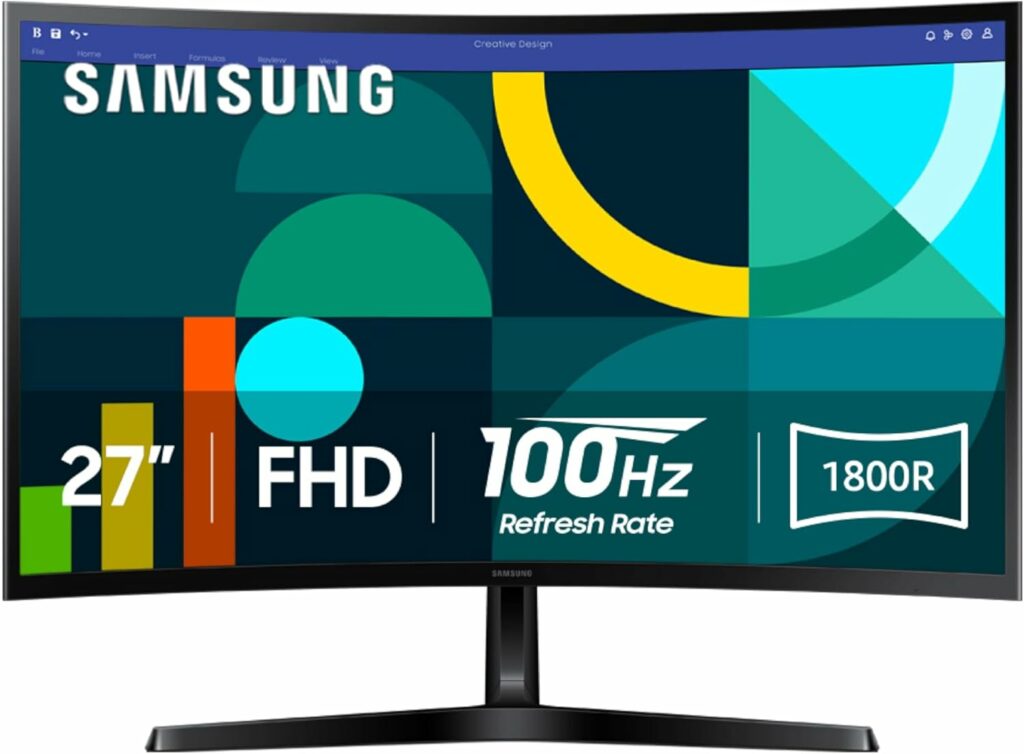
Samsung LS27D366GANXZA 27-Inch FHD 1800R Curved Monitor 100Hz
The Samsung LS27D366GANXZA is a 27-inch Full HD (1920×1080) monitor built around an 1800R curvature. It sits squarely in the “accessible curved monitor” category, offering a gentle wrap-around feel that flat panels can’t match. With a 100Hz refresh rate, it’s a step above the standard 60Hz office fare, making motion appear smoother whether you’re scrolling through documents or watching videos. This is a monitor designed for the home user who wants a touch of modern immersion without diving into ultrawide or high-res territory.
Key Features
- 1800R Curvature: The most noticeable feature is the curve. At 27 inches, the 1800R radius wraps the screen slightly toward you, reducing eye strain by keeping the edges of the screen at a more consistent distance from your eyes. It’s subtle but effective for long sessions.
- 100Hz Refresh Rate: This isn’t a gaming-first spec, but it’s a huge quality-of-life improvement over 60Hz. Scrolling web pages, moving windows, and casual gameplay all feel noticeably smoother and more responsive.
- 27-Inch FHD Resolution: At this size and resolution, pixel density is moderate—about 81 PPI. Text is clear for general use, and the curve helps the image feel cohesive. This is a sweet spot for users who don’t need 4K but want a larger screen without scaling headaches.
- AMD FreeSync Support: While not marketed as a gaming monitor, FreeSync compatibility helps reduce screen tearing during lighter gaming sessions, making it a versatile pick for a mixed-use desk.
Use Cases
Compare similar picks
Final Verdict
Recommend, with conditions. The Samsung LS27D366GANXZA is a clear buy for anyone upgrading from a basic 60Hz flat monitor who wants a more comfortable, immersive viewing experience for daily productivity and casual entertainment. It’s not for graphic designers or competitive gamers, but for the vast majority of home users, it delivers excellent value. Skip it if you need 4K resolution or a flat panel for strict color-critical work.
Alternatives
If you need a flat panel for precise design work, look for a 27-inch IPS monitor with better color accuracy. For competitive gaming, a 144Hz or higher flat monitor with a faster response time would be a better fit.

HomeGear editors evaluate and recommend products independently. Purchases through affiliate links may earn us a commission, which helps support our editorial work.




Brutal Paid Advice — The Ice Cream Shop

WALKINGPAD R3H+ 2-in-1 Folding Treadmill 7.5 mph Review for 2026

Concept2 SkiErg SkiErg Only Review for 2026

NordicTrack T Series 10 Treadmill Review for 2026

Weber Genesis S-415 4-Burner Propane Gas Grill Review for 2026

Best Humidifiers 2026: Top 50 Tested & Ranked

20 Best Sous Vide Machines for 2026: Real Picks Worth Buying

LG 38WR85QC-W 38-Inch Curved UltraWide WQHD Monitor Review for 2026

Best Dehumidifiers 2026: Top 40 Tested & Ranked

Desk Monitor Buying Guide


-
 Home Comfort & Climate Roundups5 months ago
Best Humidifiers 2026: Top 50 Tested & Ranked
-
 Kitchen & Dining Roundups5 months ago
20 Best Sous Vide Machines for 2026: Real Picks Worth Buying
-
 Home Office Reviews5 months ago
LG 38WR85QC-W 38-Inch Curved UltraWide WQHD Monitor Review for 2026
-
 Home Comfort & Climate Roundups5 months ago
Best Dehumidifiers 2026: Top 40 Tested & Ranked
-
 Home Office Guides5 months ago
Desk Monitor Buying Guide
-

 Outdoor & Garden Roundups8 months ago
Best 40 Patio Sets: The Most-Bought Picks for 2026
-
 Cleaning & Laundry Reviews5 months ago
roborock Saros 10R Robot Vacuum and Mop with Self-Emptying Review for 2026
-

 Outdoor & Garden Guides6 months ago
Patio Set Buying Guide